
What this audit covers and how to reproduce it
Most SEO audit tutorials stop at theory: a list of things you should check, with stock screenshots and no way to verify any of it. This article takes the opposite approach. We ran a real technical audit on two publicly accessible sites on 28 November 2026 and saved every result, so you can repeat each step and compare your output with ours.
The two audit targets were chosen deliberately. The first is example.com, the minimal demonstration page maintained by IANA. It is stable, never changes and — like many real small-business pages — ships with almost no SEO metadata, which makes it a reliable way to see what an audit tool reports when signals are missing. The second target is lifeseos.com, the production site you are reading now: a real Next.js application with four languages, a blog and interactive tools.
Every check below uses a free LifeSeos tool that runs the same way for you as it did for us. Where a command line is more precise, we show the exact command. Nothing in this article is simulated.
Step 1 — Confirm one canonical host with the HTTP Status Checker
The first question in any technical audit is brutally simple: how many versions of this site answer with HTTP 200? Search engines treat https://lifeseos.com and https://www.lifeseos.com as different origins. If both return content, every signal — links, canonicals, sitemap entries — can split across two copies of the site.
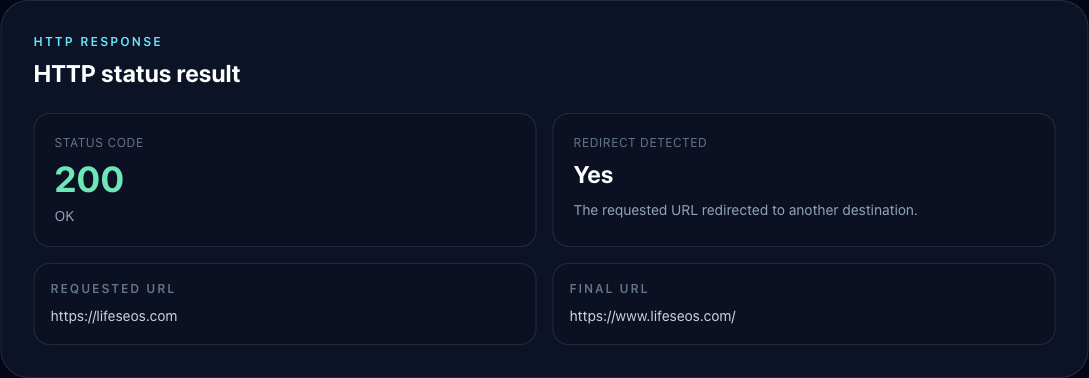
We ran the HTTP Status Checker against the bare domain. The result: the requested URL https://lifeseos.com redirected once to https://www.lifeseos.com/, which answered 200 OK. Exactly one redirect hop, exactly one final address. That is the configuration you want: the apex domain permanently redirects to the canonical www host.
You can verify the same thing without any tool. The command curl -sS -o /dev/null -w "%{http_code} %{redirect_url}" https://lifeseos.com prints 308 and the www destination. A 308 (or 301) tells crawlers the move is permanent, so ranking signals consolidate on the target instead of being shared between two addresses.
Step 2 — Audit a page with missing metadata (example.com)
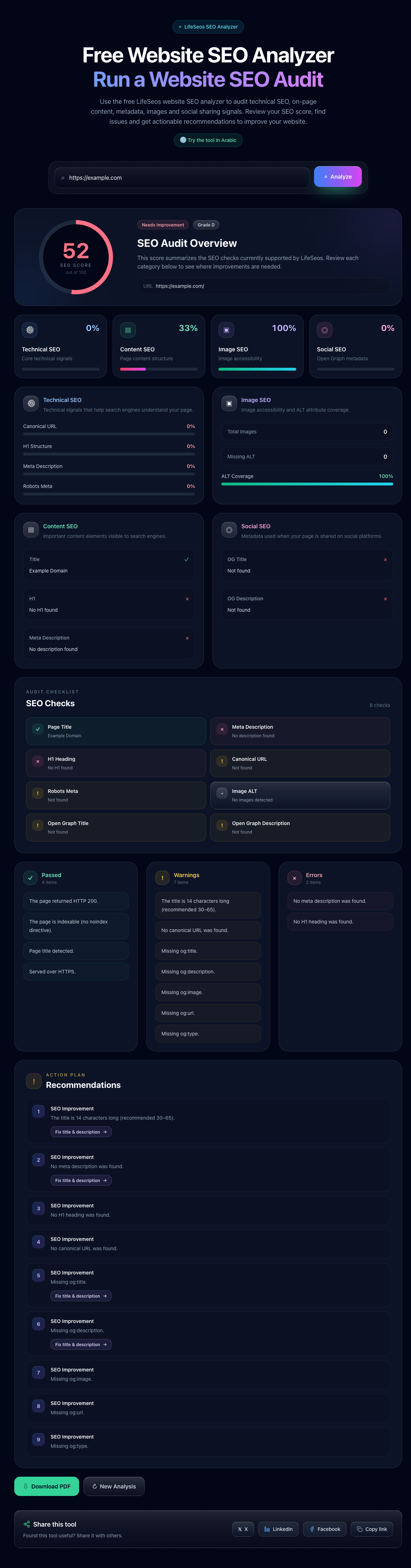
Next we pointed the SEO Analyzer at https://example.com. The page is a single paragraph — deliberately minimal — so the report isolates what happens when standard signals are absent. The analyzer returned 52 out of 100, grade D, "Needs Improvement".
Two findings were classified as errors: the page has no meta description and no H1 heading. Both matter for different reasons. A missing H1 removes the strongest on-page statement of the page's topic. A missing meta description hands control of the search snippet to Google, which will assemble one from arbitrary page text — usually a weaker pitch than the one you would write yourself.
Seven warnings completed the picture: the title "Example Domain" is only 14 characters (well under the recommended 30–65), there is no canonical URL, and all five Open Graph properties (og:title, og:description, og:image, og:url, og:type) are absent, so the page renders as a bare link when shared on social platforms. Notice what the report also shows: four checks still passed, including HTTP 200 and HTTPS. An audit is not only a list of failures — knowing which foundations are solid keeps you from fixing things that are not broken.
Step 3 — Audit a production site (lifeseos.com)
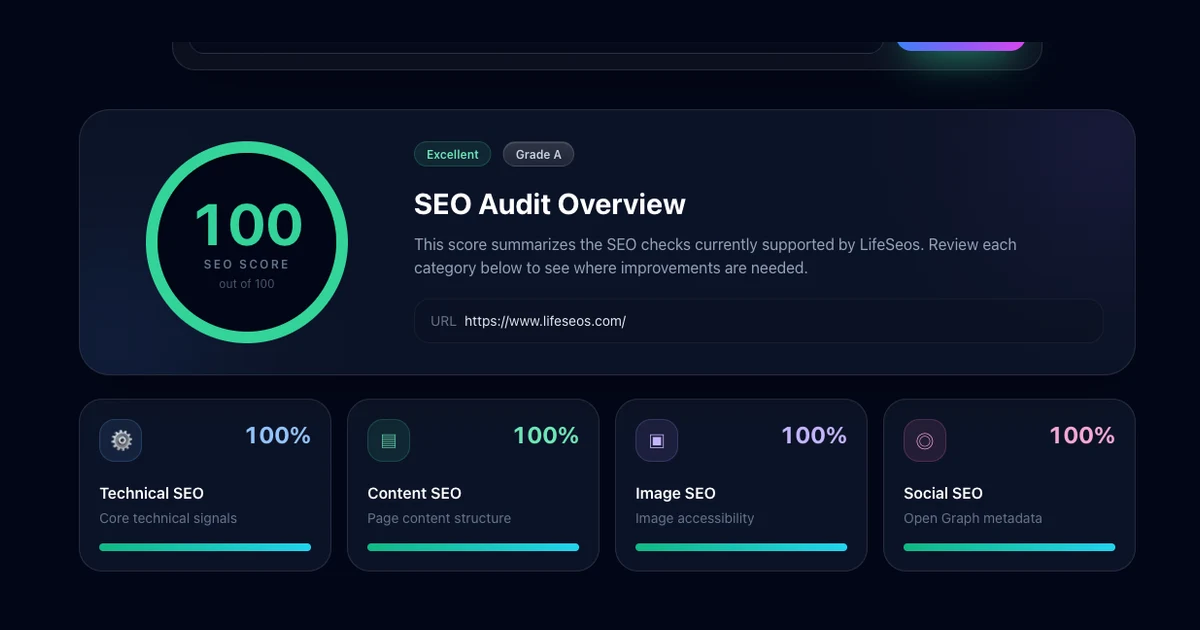
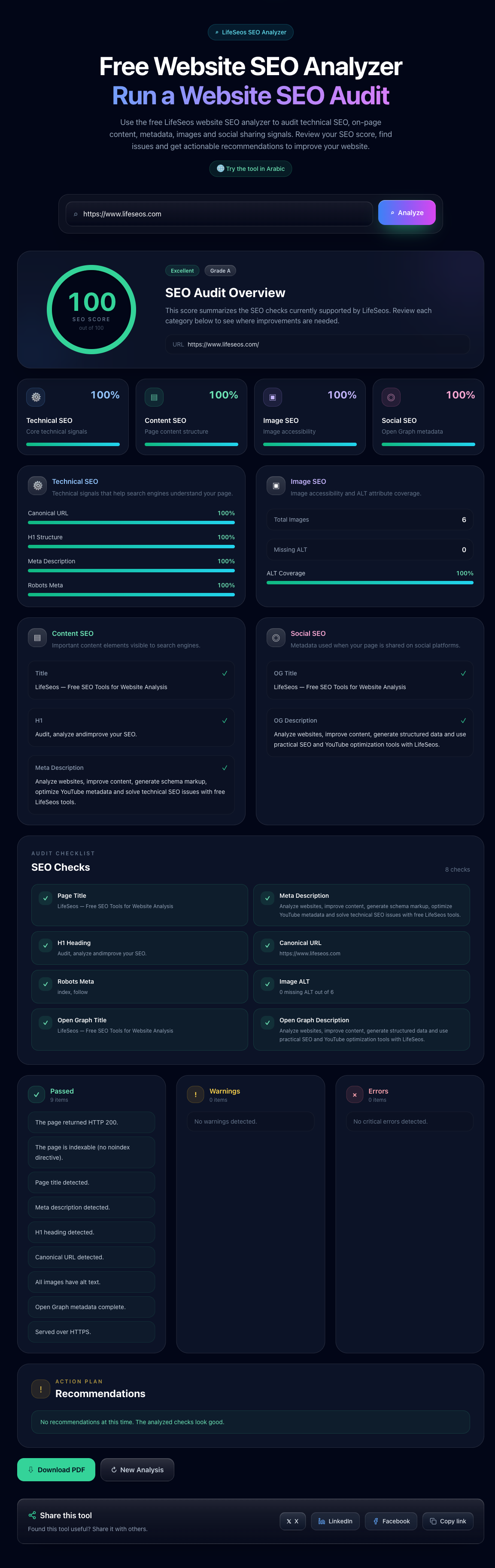
Running the same analyzer against our own homepage returned 100 out of 100, grade A: HTTP 200, indexable, title and meta description present, one H1, self-referencing canonical, complete Open Graph data and alt text on all six images. A blog article URL (/blog/robots-txt-guide) scored 92 with one warning — the title is 66 characters, one over the recommended range — which is exactly the kind of marginal finding you can safely deprioritize.
We want to be transparent about one detail, because it is the kind of thing an honest audit should surface. While preparing this article we noticed the analyzer reported our homepage H1 as "Audit, analyze andimprove your SEO." — two words fused together. The cause was in our own tooling: the extractor concatenated text across HTML element boundaries without inserting a space, and our hero heading animates each word in its own <span>. The rendered page was fine; the reading of it was not. We fixed the extractor the same day. Every audit tool has edge cases — what matters is that when you find one, you verify it against the page source and correct it.
That episode illustrates a rule worth keeping: never treat a single tool's output as ground truth. When a finding looks odd, confirm it in the HTML source or with a second method before you change anything.
Step 4 — Measure performance, and expect the numbers to move
For the performance pass we used the Page Speed Analyzer, which runs Google Lighthouse against the URL with a mobile strategy. Here is the finding most tutorials skip: two runs of the same page, minutes apart, produced meaningfully different numbers. The first run scored 82 with a Largest Contentful Paint of 3.1 seconds; the second scored 98 with an LCP of 2.0 seconds, First Contentful Paint at 1.7 seconds, zero layout shift and 60 ms of total blocking time.
Both runs are real. Lab performance tests simulate a mid-range phone on a throttled connection from a data center, and the result depends on server response time at that moment, network conditions and test hardware load. Google's own guidance is to treat lab data as a debugging signal and field data (real-user Core Web Vitals, visible in PageSpeed Insights or Search Console) as the ranking-relevant measurement.
The practical takeaway: never quote a single Lighthouse run as proof of anything. Run the test two or three times, look at the range, and act only on values that stay consistently outside the recommended thresholds — for LCP that threshold is 2.5 seconds on mobile.

What an automated audit cannot tell you
A checklist tool verifies the presence and shape of signals — it cannot judge their quality. The analyzer can confirm a meta description exists; it cannot tell whether the description is worth clicking. It counts alt attributes; it does not read them. It does not execute the page the way Google's renderer does, so JavaScript-injected content, render-blocking behavior and real-user interaction delays need other instruments.
A complete technical review therefore pairs automated checks with three manual habits: read the rendered HTML source yourself (curl or view-source), confirm indexability and canonicalization in the response headers and <head>, and cross-check performance lab numbers against field data when the site has enough traffic to provide it.
- Reproduce every finding with a second method before acting on it.
- Separate errors (indexing blockers, missing H1) from cosmetic warnings before prioritizing.
- Run performance tests more than once; treat single-run scores as hints, not verdicts.
- Keep a dated record of each audit so the next one can measure progress instead of starting over.
Run the same audit on your site
You can repeat this entire audit on any public page in about five minutes: confirm the redirect behavior with the HTTP Status Checker, run the SEO Analyzer for on-page and technical signals, then measure speed with the Page Speed Analyzer. If you want a guided structure for a deeper review — including content, internal links and indexing — our complete SEO audit guide walks through the full checklist.
Sources consulted for this article: Google Search Essentials (developers.google.com/search/docs/essentials), the Core Web Vitals thresholds on web.dev/articles/vitals, and the Lighthouse scoring documentation (developer.chrome.com/docs/lighthouse). All measurements were taken on 28 November 2026 with the production versions of the LifeSeos tools linked below.
Put this guide into practice
Open the related LifeSeos tool and apply what you just learned to your own website.
SEO Analyzer